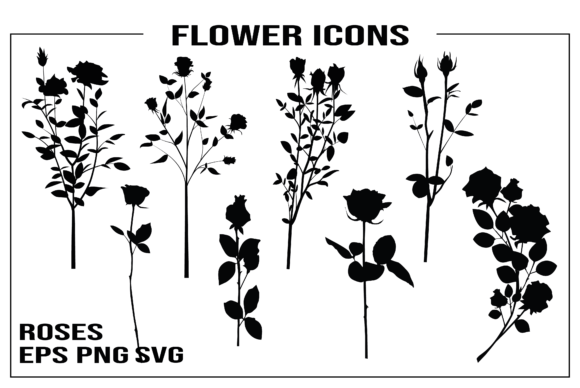
21 High-Quality Flower Icons for Design
In the world of digital creation, the right visual element can transform a simple layout into a cohesive masterpiece. This collection of Flower Icons offers exactly that: a versatile toolkit designed to elevate your projects with elegance and precision. Whether you are a seasoned graphic designer or a hobbyist just starting with your cutting machine, these 21 high-quality design elements provide a solid foundation for creativity. They are not merely clip art; they are carefully crafted assets intended for professional-grade output across various mediums.
The true value of this set lies in its adaptability. From the delicate curves of a petal to the structured lines of a stem, each icon is rendered to maintain clarity at any size. The inclusion of both raster and vector formats ensures that you have the flexibility to work within your preferred software environment without compromising on quality. This is a resource built for practical application, allowing you to focus on your creative vision rather than struggling with file compatibility or pixelation.
A Versatile Toolkit for Every Creator
What makes this specific set of Flower Icons stand out is the comprehensive nature of the file delivery. You receive a single ZIP folder containing everything needed to execute complex designs immediately. Inside, you will find 21 individual PNG files with transparent backgrounds, 21 individual SVG files, and one master EPS file containing all icons. This variety addresses the diverse needs of modern creators who often juggle multiple platforms and software suites.
For those working primarily in web design or social media graphics, the PNG files offer instant usability. The transparent background feature allows these floral elements to sit seamlessly over any color scheme or texture. Imagine placing a soft watercolor-style flower over a bold typography header for a blog post, or layering several icons to create a custom watermark for your photography portfolio. The resolution is optimized to ensure crisp edges even when zoomed in, maintaining the integrity of the design on high-resolution displays.
However, the power of this collection truly unlocks with the vector formats. The SVG and EPS files are essential for anyone requiring scalability. Unlike raster images, which lose quality when enlarged, vector graphics remain sharp regardless of the output size. This is particularly crucial for print projects where dimensions matter. With an artboard dimension of 20″x30″, these files are pre-sized for large-format printing, making them ideal for banners, posters, or detailed nursery prints that require fine detail.
Bringing Projects to Life with Cutting Machines
One of the most exciting applications for these Flower Icons is in the realm of vinyl cutting and crafting. If you own a Cricut Explore, Silhouette Cameo, or similar device, the included SVG files are perfectly formatted for use in Cricut Design Space and other popular cutting software. These machines rely on clean paths and distinct shapes to cut accurately, and the vector nature of these icons ensures that every curve is recognized correctly by the software.
Consider the possibilities for party invitations and decorations. You can cut these floral designs from cardstock, vinyl, or even fabric to create layered effects. For a wedding invitation suite, you might use the icons as corner accents or central motifs, cutting them from metallic paper to add a touch of luxury. The versatility extends to home decor as well. Use the SVG files to create stencils for painting murals, or cut them from wood veneer to make personalized coasters and wall art.
It is important to note that while these files are designed for compatibility with major cutting machines, users should verify their specific equipment's capabilities before purchasing. Most modern machines accept SVG and DXF formats, but checking your software's supported file types ensures a smooth workflow. Once imported, you can resize, rotate, and duplicate the icons to create intricate patterns or borders. This flexibility turns a simple set of 21 icons into a library of endless design combinations.
Practical Applications for Digital and Print Media
Beyond crafting, these digital illustrations serve as powerful tools for digital scrapbooking and stationery design. In digital scrapbooking, layers are key to creating depth and storytelling. The transparent PNGs allow you to stack flowers behind photos or weave them through journaling blocks. Because the files are high-quality, they do not introduce noise or blur into your digital pages, preserving the professional look of your layouts.
For small business owners and entrepreneurs, these icons can enhance branding materials. A florist, boutique owner, or lifestyle blogger can incorporate these elements into logos, email signatures, and product packaging. The neutral yet elegant style of the flowers ensures they complement a wide range of brand identities without overpowering the text or primary imagery. Consistency is vital in branding, and having a set of matching icons helps maintain a unified visual language across all customer touchpoints.
Print-on-demand sellers also benefit significantly from this collection. Whether you are designing t-shirts, tote bags, or mugs, the ability to scale the vector files means you can apply the same design to a small sticker and a large banner with equal success. The 20″x30″ artboard provides ample room to arrange multiple icons into a repeating pattern or a focal point illustration. This efficiency saves time during the design phase, allowing you to produce more products faster.
Maximizing Creativity with Organization and Style
To get the most out of these Flower Icons, organization is key. When working with 21 individual elements, it helps to categorize them by style, size, or intended use within your project management system. Many designers find it useful to create swatch libraries in Adobe Illustrator or Corel Draw using the EPS file. This allows for quick drag-and-drop access during future projects, streamlining the design process.
When applying these icons to different audiences, consider the emotional tone you wish to convey. Delicate, smaller flowers might suit a baby shower theme or a gentle nursery print, while bolder, larger blooms could anchor a statement piece for a fashion event. Experiment with color palettes; although the base files may be monochromatic, vector software allows you to recolor them instantly to match your specific brand guidelines or seasonal trends.
Consistency in usage also enhances the overall aesthetic. If you are creating a series of blog posts or a line of stickers, try to use the same subset of icons throughout the collection. This repetition creates a recognizable visual identity that audiences can associate with your work. Additionally, mixing these floral elements with other textures—such as paper grain, watercolor washes, or geometric shapes—can add complexity and interest to your designs.
Final Thoughts on Creative Potential
This collection of Flower Icons represents more than just a download; it is an invitation to explore the intersection of technology and artistry. By providing high-quality vectors and rasters in a user-friendly package, it removes technical barriers and empowers creators to focus on what matters most: the story they want to tell. Whether you are cutting vinyl for a local market stall, designing a website for a new client, or simply decorating your home, these elements offer a reliable and beautiful solution.
The blend of formats ensures that no matter your skill level or toolset, you can achieve professional results. From the precision of the SVG for cutting machines to the ease of the PNG for web integration, every file serves a distinct purpose in the creative workflow. As you integrate these designs into your projects, remember that the best results come from thoughtful application and a willingness to experiment. Let these floral elements inspire your next big idea, bringing a touch of nature's beauty to your digital and physical creations.